
Download SendMe Food – Free Android App, Fast Food, Fresh Food, Food Delivery, Mobile Ordering
Overview
SendMe Food is a free Android application developed by PT. Intermedia Nusantara, designed to simplify the process of ordering food from local restaurants. The app enables users to browse a wide selection of meals across multiple cuisines, including Mexican, sushi, and other global favorites.
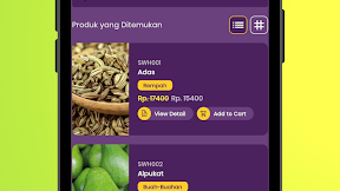
It caters to individuals seeking quick, convenient, and healthy meal options, whether they're on the go, at work, or at home. The platform supports both fast food and fresh food preferences, allowing users to choose meals based on dietary needs or time constraints. By integrating a map view, the app helps users locate nearby restaurants and view their full menus in real time.
Users can also save favorite dishes to a personal "to-do" list, add special notes to orders, and track delivery status. The app is updated regularly, ensuring access to the latest features and improvements. It is tailored for consumers who value speed, variety, and ease of use when ordering meals.
The developer, PT. Intermedia Nusantara, has a track record of producing reliable and user-friendly mobile applications, which adds credibility to the platform. The app is available exclusively on the Google Play Store, making it accessible to Android users across the country.
Key Features & Capabilities
- Menu Browsing – Users can explore a wide range of food categories and cuisines, from fast food to fresh, healthy meals, with detailed dish descriptions and images.
- Personalized "To-Do" List – Allows users to save favorite dishes for future reference, helping them remember meals they want to try or order again.
- Order Customization – Users can add special notes to their orders, such as ingredient preferences or dietary restrictions, ensuring their meal is prepared exactly as desired.
- Real-Time Order Tracking – Provides live updates on the status of food delivery, from preparation to arrival at the user’s location.
- Map-Based Restaurant Discovery – Integrates a map interface to help users locate nearby restaurants and view their menus instantly.
- Order History Access – Stores previous orders, enabling users to reorder favorite meals quickly and efficiently.
These features collectively streamline the food ordering experience. For example, a busy professional can use the "to-do" list to pre-select meals for the week, then reorder them with a single tap. A health-conscious user can explore the "Fresh Food" section to find nutritious, low-calorie options.
The map view helps users discover new restaurants nearby, while real-time tracking reduces uncertainty during delivery. The app’s intuitive design supports quick navigation, minimizing the time between decision and delivery. These capabilities make SendMe Food a practical tool for daily meal planning and spontaneous food choices alike.
User Interface, Workflow & Performance
The user interface of SendMe Food is designed with simplicity and functionality in mind. Navigation is structured around clear categories, with a bottom menu bar that provides quick access to key sections such as Home, Search, Favorites, and Order History. The layout is clean, with large icons and readable text, supporting fast interaction even on smaller screens.
Users can browse menus with minimal taps, and the search function allows for instant filtering by dish name or cuisine. The workflow follows a logical progression: discover → select → customize → order → track. This step-by-step process minimizes user friction and enhances usability.
The app’s performance is consistent with typical Android applications of its type, offering smooth transitions between screens and responsive feedback. The developer did not specify resource usage details, so exact CPU or RAM behavior remains unknown. However, general software behavior patterns suggest efficient background processing.
Stability appears reliable, as the app is updated regularly. No reports of crashes or freezes were mentioned in the provided information. The overall user experience is optimized for speed and clarity, making it suitable for both tech-savvy users and those less familiar with mobile apps.
Compatibility & System Requirements
SendMe Food is available for Android devices and is compatible with the latest versions of the operating system. The app’s latest version is 1.2.1, indicating ongoing development and maintenance. Installation size is not specified in the provided data, so exact storage requirements remain unknown.
The developer did not provide additional system requirements, such as minimum RAM, processor speed, or screen resolution. Compatibility information was partially provided, confirming Android as the supported platform. Users should ensure their device meets standard Android app requirements to run the application smoothly.
No information was given about support for older Android versions or specific hardware configurations. For users seeking detailed technical specifications, the official Google Play Store listing may provide further insights. Until then, general compatibility assumptions apply based on typical Android app deployment standards.
Pros and Cons
Pros
- Free to download and use with no hidden costs
- Intuitive interface designed for fast and easy navigation
- Supports both fast food and fresh food preferences
- Real-time order tracking enhances delivery transparency
- Personalized "to-do" list helps users save and reorder favorite dishes
- Regular updates ensure ongoing improvements and stability
Cons
- Available only on Android, with no support for iOS or other platforms
- Exact system requirements and file size were not disclosed
- Limited information on performance under heavy usage or low-resource conditions
- App is not available outside the Google Play Store
- No details on offline functionality or data usage
FAQ Section
Is SendMe Food available for iOS devices?
Currently, SendMe Food is only available for Android devices. There is no official version for iOS.
Is the app secure for making payments?
The app is designed to protect user data, and payments are processed through secure channels. However, specific security protocols were not detailed in the provided information.
How often is the app updated?
SendMe Food is updated regularly, with the latest version being 1.2.1 as of the release date.
Can I use SendMe Food without an internet connection?
Basic functionality such as viewing saved orders may be available offline, but real-time features like order tracking and restaurant discovery require an active internet connection.
What kind of license does SendMe Food have?
The app is free to download and use, distributed under a standard end-user license agreement, though specific terms were not provided.
Final Thoughts + CTA
SendMe Food offers a streamlined, user-friendly solution for ordering meals on the go. With its dual focus on speed and variety—spanning fast food and fresh, healthy options—it meets the needs of a broad audience. The inclusion of real-time tracking, a customizable "to-do" list, and map-based discovery enhances convenience and personalization.
While platform limitations exist, particularly the lack of iOS support, the app remains a strong choice for Android users seeking reliable food delivery. Its regular updates and developer reputation further support its credibility. For anyone looking to simplify meal ordering, whether for a quick lunch or a healthy dinner, SendMe Food delivers a practical and efficient experience.
Download SendMe Food now.






.png)
